Flutter- Interop
Earlier, I had built the entire application using .NET MAUI, as many readers may remember from my previous project CafeteriaApp. That project followed Clean Architecture principles with MVVM for the presentation layer and Autofac for dependency injection across domain, application, and infrastructure boundaries.
During a meetup, the organizers asked me to port the project to Flutter, since most participants were not .NET developers and would find a MAUI-based demo difficult to follow. Instead of rewriting everything from scratch, I initially decided to extract the existing business logic and Firebase integration into a standalone .NET library, callable from Flutter via FFI (Foreign Function Interface). This document summarizes the architecture, constraints, and lessons from that interop attempt and explains why I ultimately migrated everything to pure Flutter/Dart.
Objective
Extract .NET business logic into a NativeAOT library and invoke it from Flutter via FFI while maintaining debuggability, diagnostics, and predictable behavior — and present the trade-offs that led to a full Flutter/Dart rewrite.
Architecture
- Facade: a single exported layer InteropFacade exposing [UnmanagedCallersOnly] methods.
- ABI: C ABI; input/output as UTF-8 JSON.
- DI Container: initialized once (app_init); subsequent calls are pure use-case invocations.
- Error Handling: all exports wrapped in Handle(…); return { „ok“: true|false, „error“: { „code“,“message“ } }.
- Threading: single-threaded dispatcher; incoming calls accept a CancellationToken.
- Versioning: interop_version() plus a major protocol version in every request.
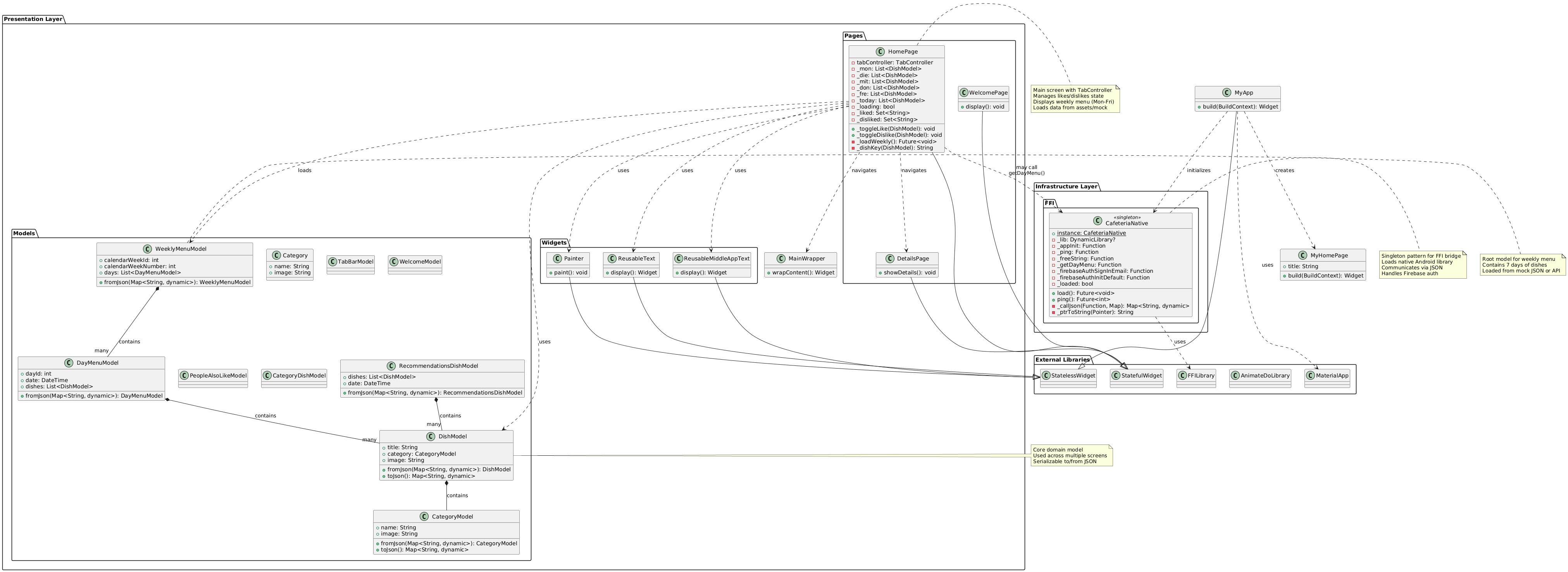
Architecture Diagram (UML)
Diagram Narrative (Clean Architecture Mapping)
- Presentation Layer (Flutter): Pages, Widgets, and MainWrapper align with MVVM/Presenter concerns — UI state, navigation, and rendering. The Models package contains UI-facing models/DTOs that mirror domain entities but remain presentation-owned.
- Infrastructure Layer: the CafeteriaNative singleton represents the Interop/FFI boundary. It loads the native library, marshals JSON requests/responses, exposes calls like getDayMenu() and Firebase auth helpers, and centralizes resource ownership (e.g., freeString).
- External Libraries: Flutter framework types and animation/FFI libraries are explicit dependencies at the system boundary.
- Data Flow: HomePage may call CafeteriaNative.getDayMenu() to fetch menu data, then map it into WeeklyMenuModel for display. Error handling, retries, and state transitions happen in the presentation layer.
Diagnostics and Logging
- Logging: Microsoft.Extensions.Logging with a ring-buffer sink and FFI callback subscribe_logs(level).
- Diagnostic Mode: interop:set_diagnostics(true) enables detailed request/response tracing with secret masking.
- Crash Safety: wrap all exports in try/catch, log JSON input and stack trace.
- Symbols: preserve .pdb, .dSYM, or map files in CI artifacts for crash analysis.
Firebase Integration
- Avoid calling native Firebase SDK from .NET AOT — common crash source.
- Initialize Firebase on the platform side (Kotlin/Swift) before loading the .NET library.
- Prefer REST APIs (Identity Toolkit, RTDB/Firestore REST) when feasible.
- If native SDK is unavoidable, use Firebase C++ SDK via P/Invoke and ensure main-thread initialization and unified c++_shared.
Firebase via .NET NativeAOT and FFI: Why It Crashes and How to Fix It
Short answer: Firebase calls from a .NET NativeAOT library over FFI often crash due to initialization, threading, and linker/runtime conflicts.
Common Crash Causes
- Improper SDK initialization (Android Application.onCreate() main thread; iOS didFinishLaunching main thread)
- No platform context/lifecycle binding
- Wrong thread (main-thread-only APIs)
- Linker/runtime conflicts (duplicate/mismatched c++_shared, iOS ODR)
- Trimming/AOT removing reflection-dependent types
- ProGuard/R8 removing required classes
Conclusion
Debugging proved to be the primary bottleneck. Debugging a NativeAOT library loaded through FFI is cumbersome: breakpoints don’t work reliably, stack traces are often lost, and crashes occur deep inside native code without readable output. I ultimately spent more time debugging the .NET NativeAOT library than it would have taken to reimplement the business logic in Flutter/Dart.
As a result, I decided to fully rewrite the application in Flutter/Dart, keeping the same Clean Architecture and use-case structure, while eliminating cross-language interop complexity and NativeAOT constraints. The project now builds faster, debugging is transparent, and Firebase integration is native and reliable.
 CodeCrafted