The CafeteriaApp is a cross‑platform application built with .NET MAUI that gives users access to the daily and weekly cafeteria menu, offers personalized recommendations, and conveniently manages personal balance. The app combines modern client technologies (MVVM, dependency injection, reactive data flows) with cloud services (Firebase Realtime Database, Firebase Auth, Analytics/Crashlytics) and an optional AI layer for recommendations. A consistent offline‑first design ensures core features remain available without a network; when connectivity returns, data is synchronized efficiently.
The goal of this blueprint is to describe the architecture, key use cases, data flows, and non‑functional requirements so that development, QA, and operations share a common, reliable foundation.
2. User Experience and Core Features
The app first presents the day’s menu. All dishes of the day are shown with name, description, category, and optional icons. In addition, the weekly menu can be browsed so users can plan ahead. Particularly relevant dishes can be marked with a simple “Like.” This preference is saved and forms the basis for personalized recommendations later.
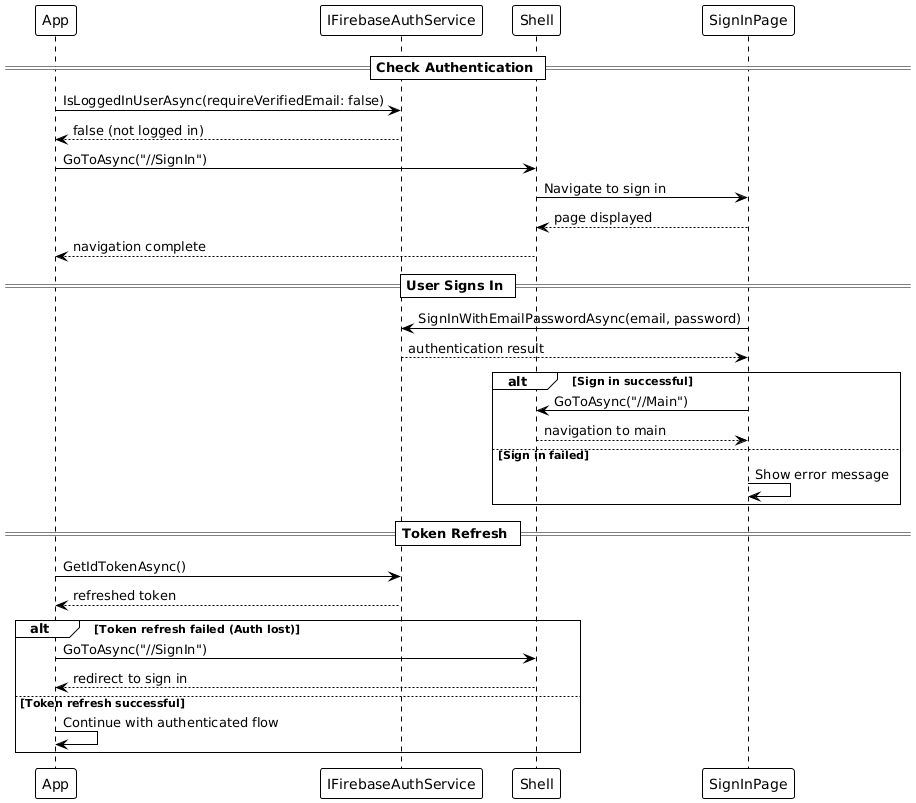
User authentication is performed via Firebase Auth using email and password. Registration and sign‑in are straightforward, support password reset via email, and allow linking anonymous accounts to email accounts. Automatic token renewal provides seamless session management without repeated user intervention.
A central element is balance management. The app shows the current balance in euro‑cents, supports top‑ups with configurable amounts, and automatically debits meals (standard price: €4.50). All transactions are tracked in a history. If the device is offline temporarily, the app buffers transactions locally and synchronizes them automatically once a network is available again.
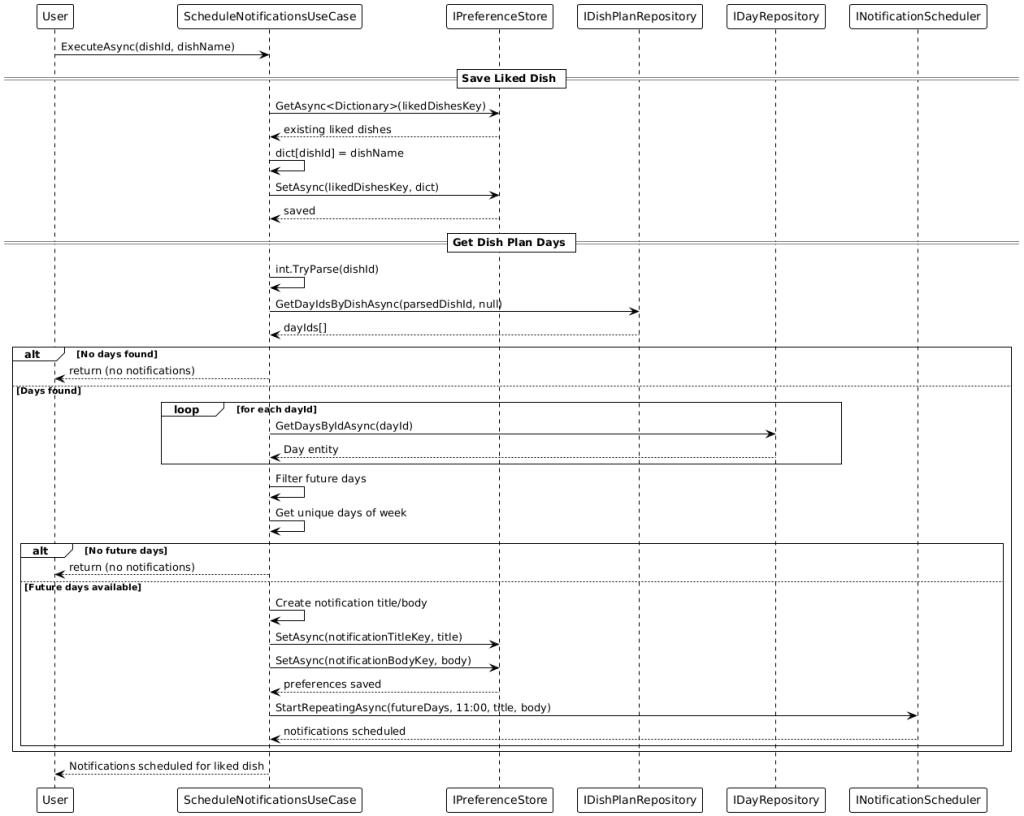
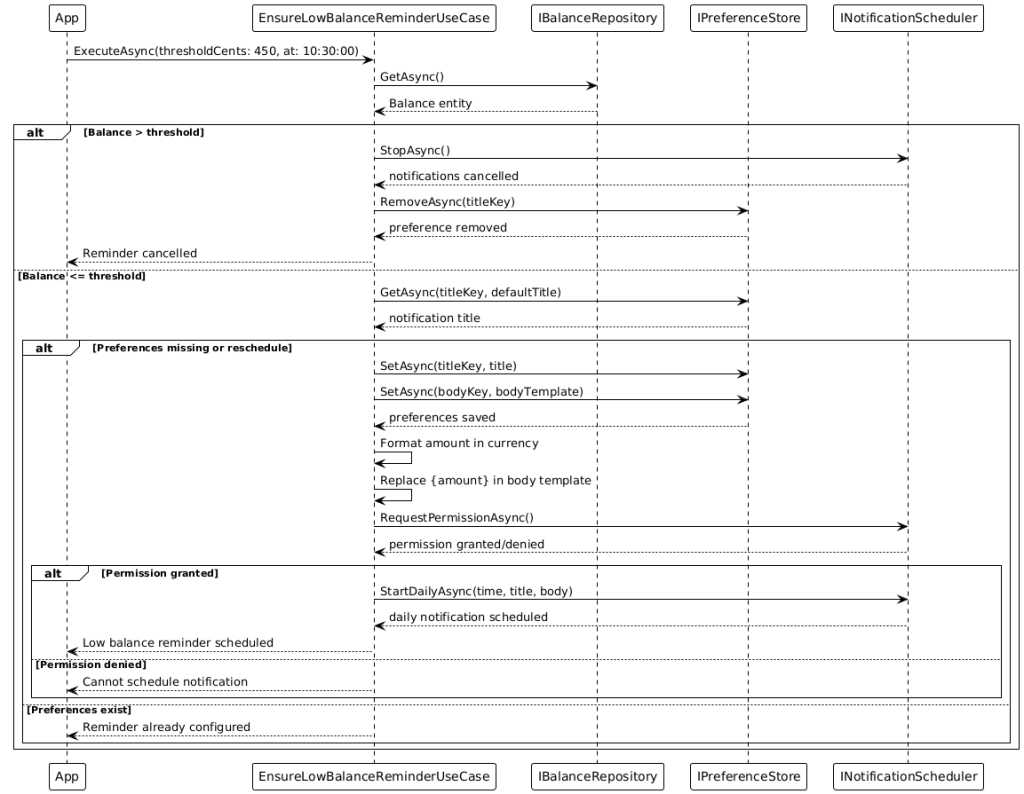
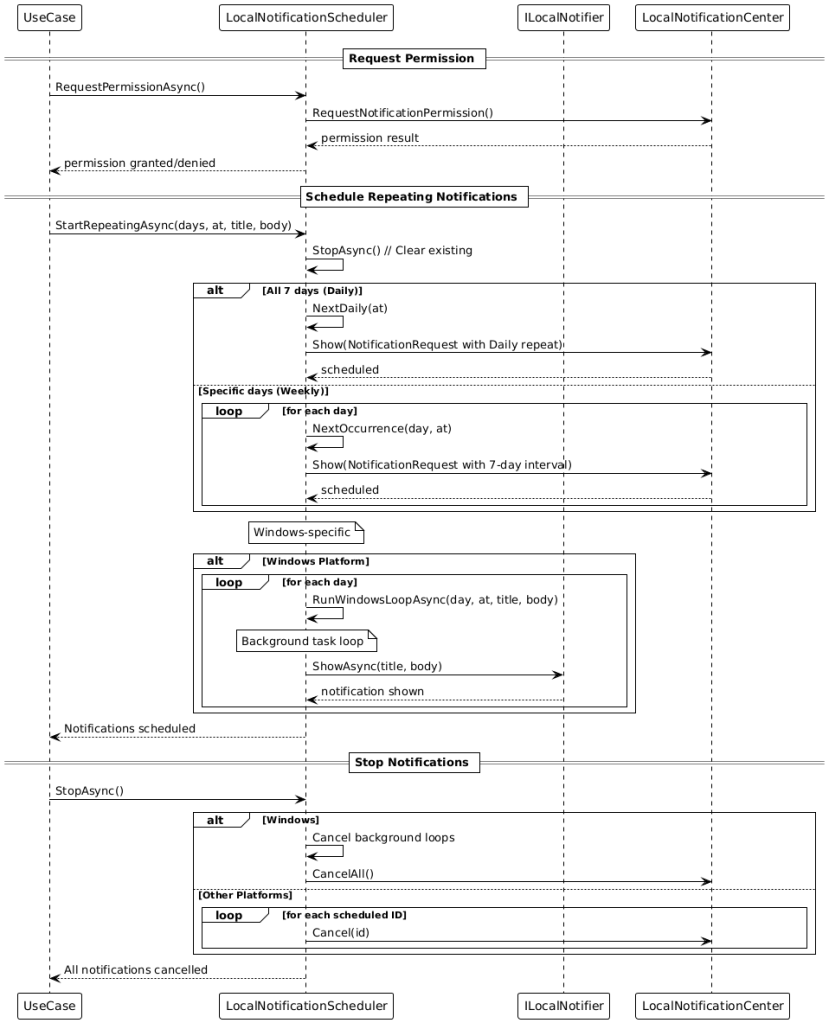
Smart notifications help in everyday use: when the balance is low (below €4.50), the app reminds the user at 10:30 by default to top up. For favorite dishes, notifications are automatically scheduled on the relevant weekdays (default 11:00). The implementation is optimized per platform—iOS uses UNUserNotificationCenter, Android uses AlarmManager, and Windows uses a local notifier. Notification times are configurable.
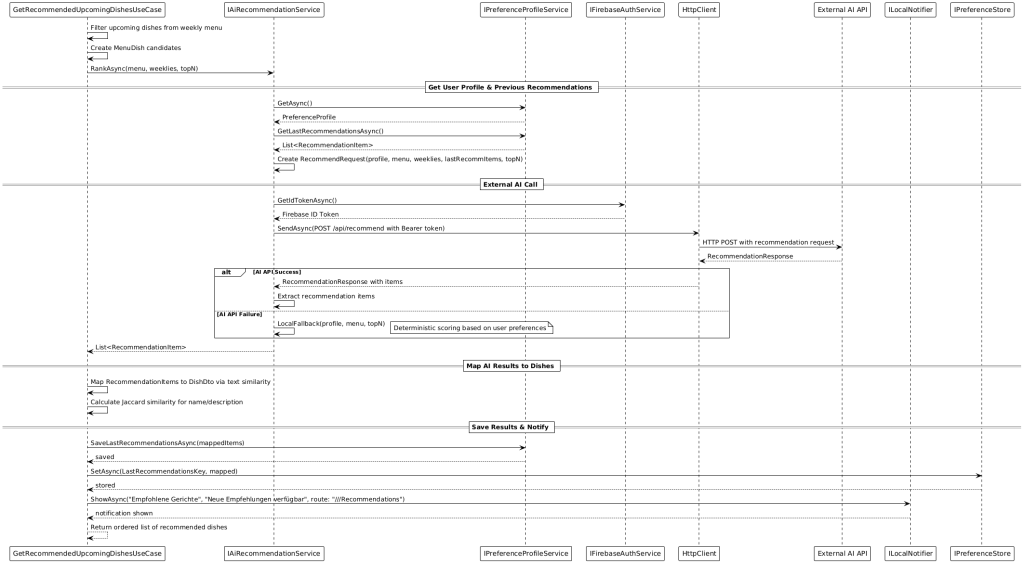
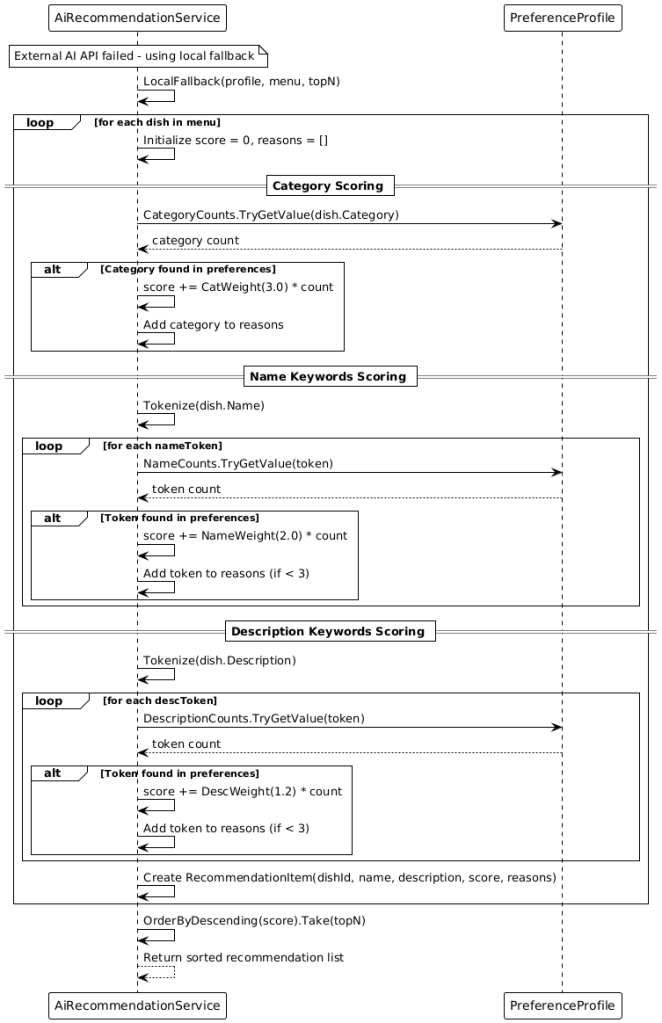
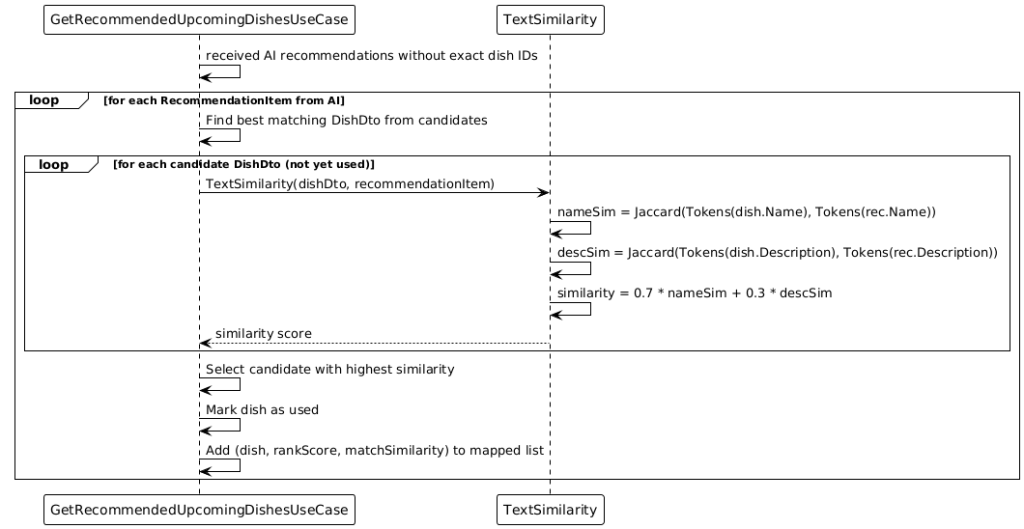
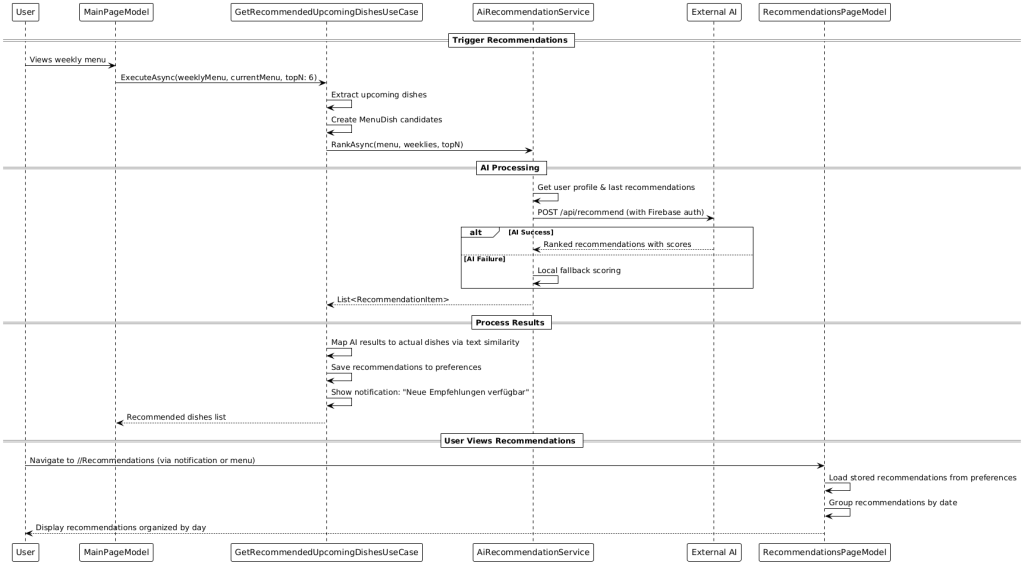
The app also provides AI‑powered recommendations. If the external Gemini‑based recommendation endpoint is available, personalized suggestions are fetched over a secured HTTP interface. If the external AI is unavailable, a deterministic on‑device fallback algorithm ranks dishes based on the user’s preference profile. A text‑similarity step robustly matches generic AI suggestions to the actual dishes available in the weekly menu.
3. Architecture Overview
The solution follows Clean Architecture:
• Domain: Core entities (e.g., Dish, Category, Day, CalendarWeek, DishPlan) and business rules without technical dependencies.
• Application: Use cases such as GetDayByDate, StartDishPlanStream, ScheduleNotifications, EnsureLowBalanceReminder, GetBalance. They orchestrate domain logic and communicate with infrastructure and UI via interfaces.
• Infrastructure: Implementations of repositories (SQLite), adapters to Firebase (Realtime Database, streams, Auth), platform schedulers for notifications, HTTP clients for external AI.
• UI (MAUI): Views and ViewModels using MVVM (CommunityToolkit.Mvvm), navigation via Shell, responsive layouts and platform specifics.
Dependency injection is implemented with Autofac. Modules remain swappable and testable. This setup enables targeted mocking in unit tests and clean composition of platform implementations.
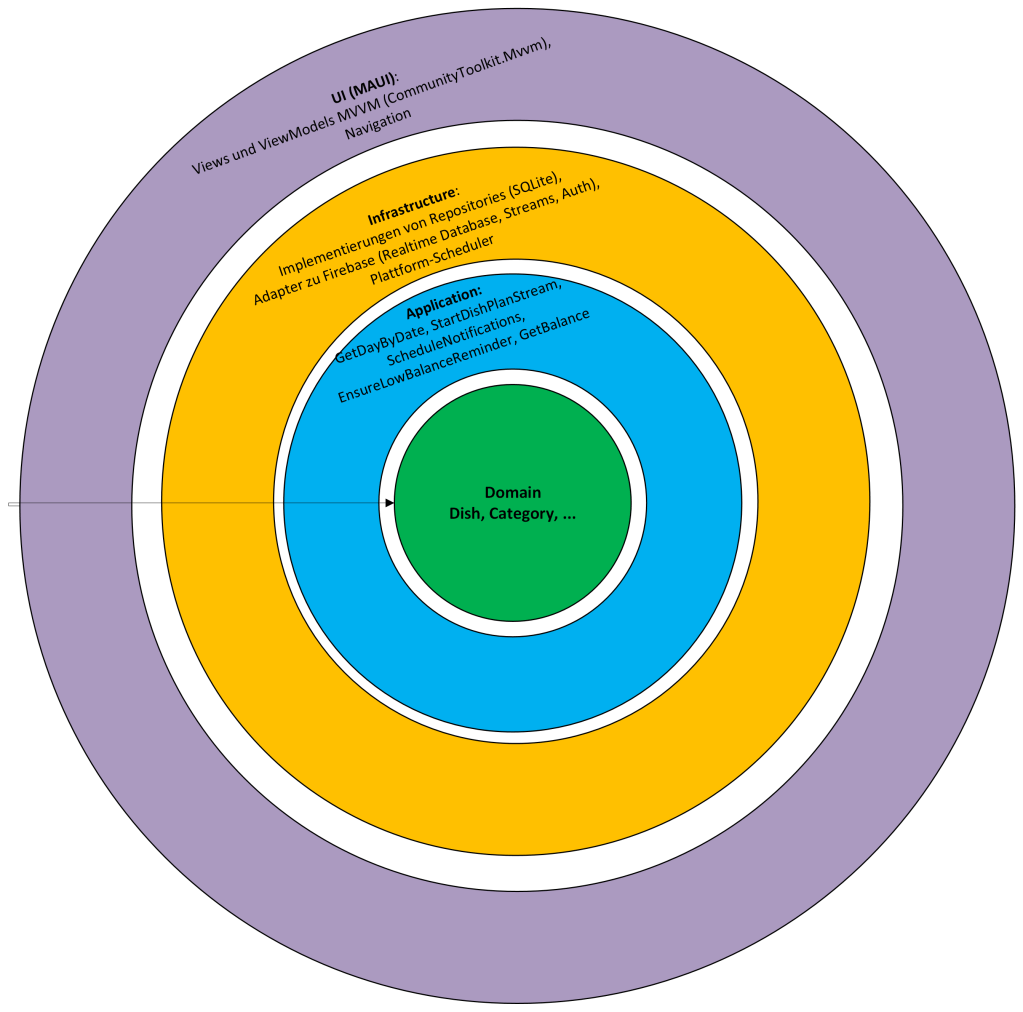
Why I chose Clean Architecture for a mobile app (and not classic Layered, Onion, or Hexagonal)
Clean Architecture strictly separates Domain & Use Cases from frameworks, UI, and data sources. For mobile (e.g., .NET MAUI), this is invaluable: UIs differ per platform, lifecycles are fragile, offline‑first & sync are demanding, and tests should run without an emulator. Clean gives stable, testable cores—everything platform‑specific hangs on the outside.
What is Clean Architecture?
Core elements (inside → out):
• Domain: Entities/value objects + business rules (pure, without technology dependencies)
• Application (Use Cases): Orchestrate domain rules; define ports/interfaces for required services (repos, notifier, auth, HTTP)
• Infrastructure: Adapters/implementations (SQLite, Firebase, notification scheduler, HTTP clients)
• UI: MAUI Views/ViewModels (MVVM), navigation (Shell), bindings
Dependency Rule: Dependencies point only inward. UI → Application → Domain. Infra depends on Application interfaces, not the other way around.
Result: Domain & Use Cases are framework‑free and easy to unit test.
Why Clean Architecture is especially good for mobile
a) Platform diversity & lifecycles
• iOS, Android, Windows have different APIs (notifications, storage, backgrounding). ⇒ Platform code stays on the outside (Infrastructure); Domain/Use Cases remain unchanged.
b) Offline‑first & sync
• Use cases encapsulate orchestration (delta sync, conflict handling, idempotency). ⇒ The same logic works with local SQLite and later cloud synchronization.
c) Evolvability
• Swap Firebase for another backend? Change the notification plugin? ⇒ Only adapters change; the use‑case ports stay stable.
d) Performance & resilience
• Use cases control retries/backoff, transactions, throttling → predictable behavior even on mobile networks.
e) Security & privacy
• Rules for data minimization/masking live centrally in Use Cases/Domain, not scattered across UI/Infra.
Why not classic Layered Architecture (3‑tier)
Typical issues:
• Leaky abstractions: UI knows DTOs/ORM entities from the DAL; DB changes bleed into the UI.
• Anemic domain: “Service classes” contain logic, entities are mere data bags → hard to test and reuse.
• Framework coupling: Business logic tied to frameworks/HTTP stack; replacing components is costly.
• Circular dependencies: Services reference each other; the dependency graph becomes fragile.
• Mobile specifics (lifecycle/permissions/background): Where does this belong? Layered gives little guidance.
In short: Layered is often too vague and encourages UI→DB coupling. For mobile, that’s fatal.
Why not Onion or Hexagonal?
Important: Onion/Hexagonal and Clean are siblings. All three rely on dependency inversion and ports/adapters. The difference is focus and pragmatism.
Hexagonal (Ports & Adapters)
• Pros: Clear ports, good isolation of external systems
• Cons in mobile context: Tendency toward “port inflation” (many interfaces/adapters), which creates overhead for small/medium apps. Less guidance for shaping use cases.
Onion Architecture
• Pros: Domain at the center, layers around—clean
• Cons: Often doesn’t describe use cases as their own layer. In mobile, use cases (e.g., EnsureLowBalanceReminder, StartDishPlanStream) are the natural place for lifecycle, sync, and retry orchestration. Clean names this explicitly.
Why Clean is preferable here
• Use‑case‑centered: Precisely what you need with MAUI/MVVM—commands bind directly to use cases.
• Pragmatic structure: Enough rules to prevent chaos without Hexagonal overhead.
Bottom line: You could call it “Hexagonal with an explicit use‑case layer”—that’s essentially Clean.
Concrete mapping (CafeteriaApp)
• Domain: Dish, Category, Day, CalendarWeek, Balance (+ rules)
• Application: GetDayByDate, StartDishPlanStream, EnsureLowBalanceReminder, GetRecommendedUpcomingDishes.
– Ports: IDishPlanRepository, INotificationScheduler, IFirebaseAuthService, IAiRecommendationService.
• Infrastructure: DishPlanRepository (SQLite), Firebase adapters (Auth/Realtime), notification schedulers (iOS/Android/Windows), HTTP client for Gemini.
• UI (MAUI): Views & ViewModels (CommunityToolkit.Mvvm), Shell navigation, bindings.
Dependency inversion (example, C# with Autofac):
// Application depends on abstractions only
builder.RegisterType<DishPlanRepository>().As<IDishPlanRepository>().SingleInstance();
builder.RegisterType<AndroidAlarmNotificationScheduler>().As<INotificationScheduler>().SingleInstance();
builder.RegisterType<GetRecommendedUpcomingDishesUseCase>().AsSelf(); // consumed by VM via ctor injection
The UI only knows the use case; the use case only knows interfaces; the implementation depends outward.
Typical anti‑patterns Clean avoids
• Fat ViewModels: Business logic inside VMs instead of use cases.
• Service locator: Hidden dependencies; prevents tests.
• Framework leakage: HttpResponseMessage/SqliteConnection dripping into the domain.
• God services: One “DataService.cs” that does everything → untestable, unclear.
When alternatives might still fit
• Layered: Very small proof‑of‑concept/throw‑away, minimal logic, no offline/sync.
• Hexagonal/Onion: Large domain, many teams, strict interface contracts where extra port rigor is desired.
For a mobile product app with offline‑first, notifications, sync, and AI integration, Clean is the best balance of structure, testability, and pragmatism.
4. Data Model and Persistence
Domain models are intentionally compact. Categories group dishes, which are part of a day within a calendar week. The relational mapping in SQLite uses clear foreign‑key relationships (e.g., Dish.CategoryID → Category.ID, DishPlan.DayID → Day.ID). Additional local tables for balance and transactions act as an event history. This event‑based design enables precise traceability and robust conflict resolution during up/down sync. A repository layer is used. A generic SQLite base construct (e.g., SqliteRepoBase) encapsulates connection setup, transactions, and parameter binding. Repositories like DishPlanRepository provide upserts, week/day queries, and bulk operations (e.g., delete by CalendarWeek). This reduces boilerplate and improves reliability.
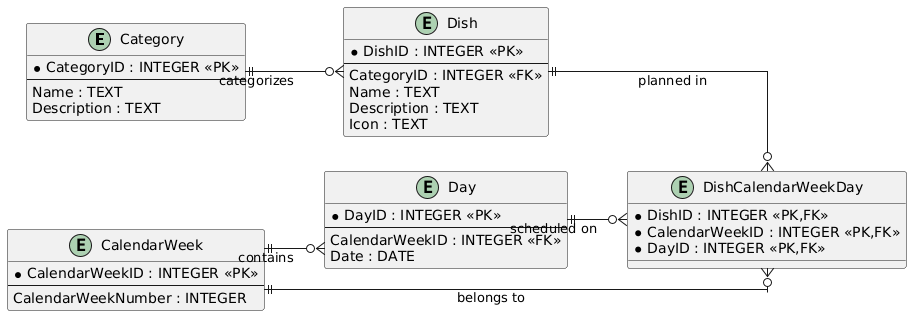
5.Synchronization and Offline‑First
Synchronization is incremental and event‑driven:
• Realtime streams from Firebase update the local database nearly live.
• On app activation or network change, a delta sync is performed to close potential gaps.
• Conflict handling follows “last‑write‑wins” with server timestamps; domain‑specific merge rules (e.g., prioritizing confirmed menu items) can be added.
• Idempotent upserts ensure retries do not create duplicates.
The app is fully functional offline: local changes (e.g., likes, transactions) are persisted and reliably pushed to the cloud when available. A dedicated sync service batches operations and protects critical sections via SemaphoreSlim and CancellationTokens.
6.Authentication and Session Management
Authentication uses Firebase Auth. Anonymous sessions can later be linked to email accounts without losing data. Tokens are renewed automatically; if a refresh fails, the app guides the user back to the sign‑in route in a controlled manner. All auth flows are represented in Shell routing, creating consistent navigation paths.
7. Notifications (platform‑optimised)
Notifications are configurable and user‑centric. For low balance, a use case checks the balance and schedules a daily recurring reminder (default: 10:30). For liked dishes, weekday‑based reminders are scheduled (default: 11:00) if those dishes appear on future days of the weekly plan. Delivery is platform‑compliant:
• iOS: UNUserNotificationCenter with explicit permission prompt.
• Android: Scheduling via AlarmManager or WorkManager‑compatible strategies.
• Windows: Local notifier with a lightweight background loop that checks scheduled times.
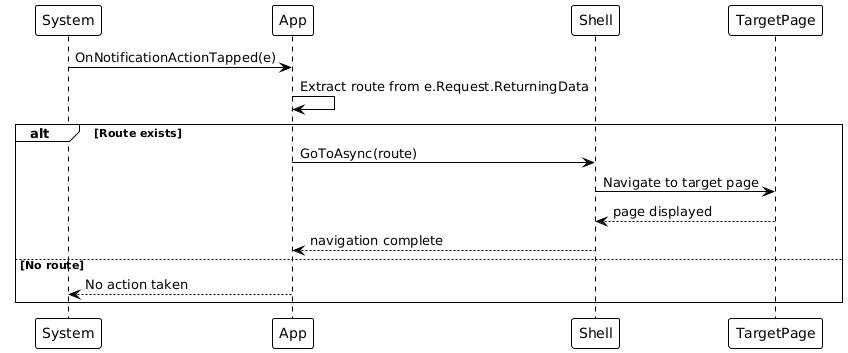
Notifications are created idempotently and cleaned up before rescheduling to prevent duplicates. Actions can trigger deep‑link navigation (Shell route).
8.Balance Management
Balance is tracked in euro‑cents to avoid rounding errors. Top‑ups and debits are stored as balance events and displayed in the transactions history. By default, €4.50 is debited per meal. When offline, bookings are recorded locally and reconciled with the backend at the next opportunity. A use case ensures low‑balance reminders are active only when the actual balance is below the threshold.
9. AI‑Powered Recommendations
The recommendation pipeline consists of three stages:
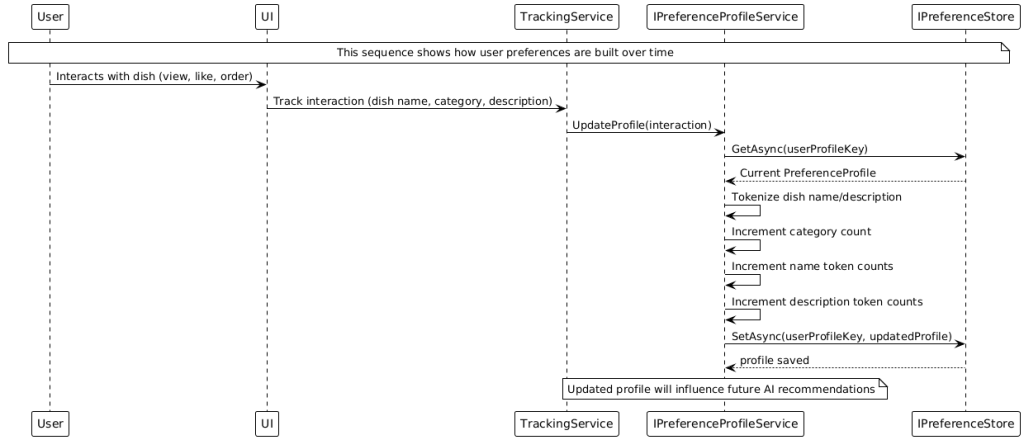
1) Profile building: A profile service counts recurring categories and tokens from dish names/descriptions based on user interactions.
2) Ranking: Primarily, an external AI API (Gemini‑based) is called through a secured HTTP endpoint (authentication via Firebase ID token). If results are returned, they are processed; otherwise, a local fallback algorithm weights dishes based on the profile (e.g., categories > name tokens > description tokens) and produces a deterministic ranking.
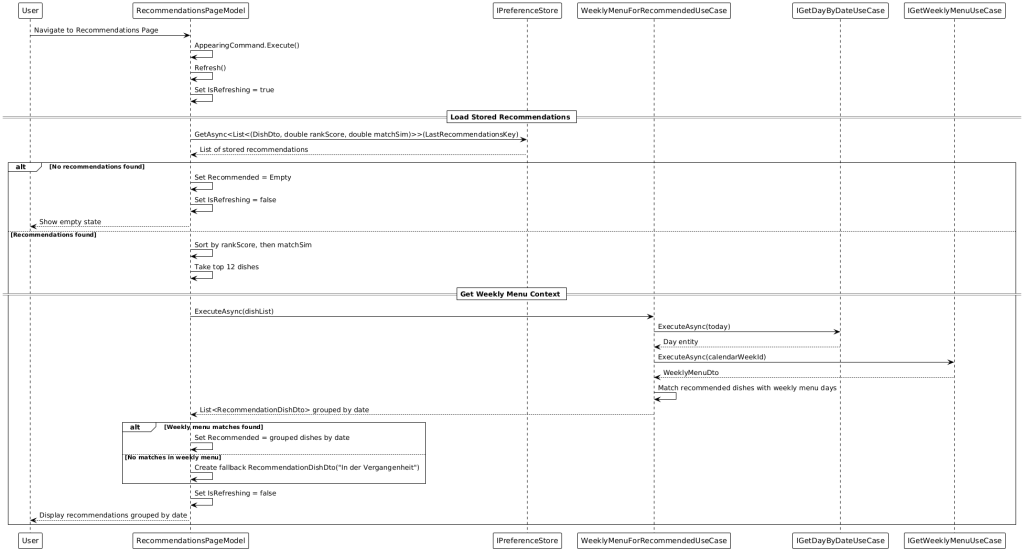
3) Text‑similarity matching: Since external recommendations may not always contain exact IDs, they are matched via similarity (e.g., weighted Jaccard of name/description) to the actual dishes in the weekly menu. The best matches are stored and can be announced via notifications.
10. UI/UX and Cross‑Platform
The UI is responsive across smartphones, tablets, and desktop. .NET MAUI provides native performance on iOS, Android, and Windows. The MVVM structure with CommunityToolkit.Mvvm enables clear state management, bindings, and commands. Navigation is via Shell, providing consistent deep‑linkable paths (e.g., from notifications).
11. Fault Tolerance, Logging, and Observability
A comprehensive error‑handling and logging concept ensures stability. Important paths (auth, sync, payments, push scheduling) use structured logging. Crashlytics captures crashes with context; Analytics provides usage metrics. Repeatable operations are idempotent; transient errors trigger targeted retries with backoff.
12. Security and Data Protection
Data minimization: Only data required for the purpose is stored.
• Transport encryption: Exclusively HTTPS/TLS.
• Auth hardening: Token renewal, logout flows, protection of sensitive areas.
• Authorization model: Only authorized endpoints; Firebase/Realtime rules govern access to user paths.
• Privacy: Clear consent for notifications, transparent presentation of data usage.
13. Performance and Scalability
• Client‑side: Asynchronous I/O, caching in SQLite, selective projection queries.
• Sync: Delta strategy, streams instead of polling; payload sizes limited.
• AI path: Batch requests and server‑side caching where useful; local fallback guarantees responsiveness.
14. Test Strategy and Quality Assurance
• Unit tests for use cases/repositories (NUnit), mocks for infrastructure (Autofac‑based).
• Integration tests with test SQLite and stubs for Firebase/HTTP clients.
• UI tests (Shell navigation, bindings, offline scenarios).
15. Lifecycle and Concurrency
The app reacts to start/resume/sleep with targeted actions: upon activation, sync and reminder checks are started. SemaphoreSlim protects critical sections (e.g., one‑time initial kick‑off), MainThread dispatching guarantees UI safety, and CancellationTokens prevent resource leaks in abort situations.
16. Configuration and Defaults
• Meal price: €4.50 (configurable)
• Low‑balance threshold: €4.50
• Low‑balance time: 10:30 (local)
• Dish reminders: 11:00 (local)
• Top‑N recommendations: e.g., 6
17. Extensibility and Roadmap
• Payment provider integration (external wallets like Stripe)
• A/B testing for recommendations/notifications
• Accessibility (larger fonts, screen‑reader optimizations)
• Multi‑language support via resources
18. Risks and Assumptions
• External AI dependency: mitigated by local fallback.
• Network volatility: addressed by offline‑first and idempotent upserts.
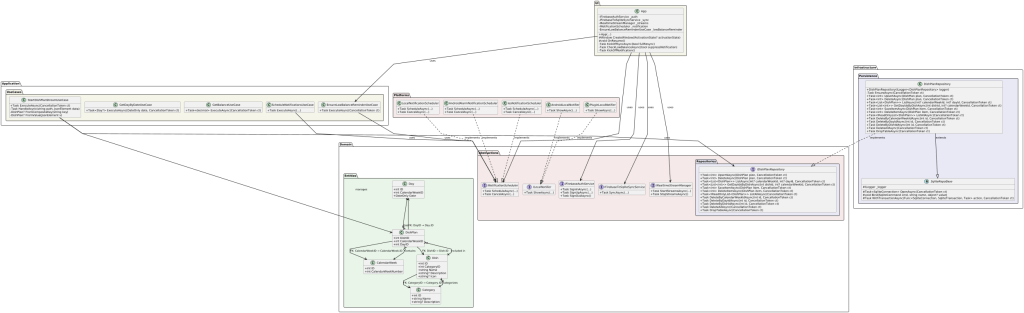
Clean Architecture Overview
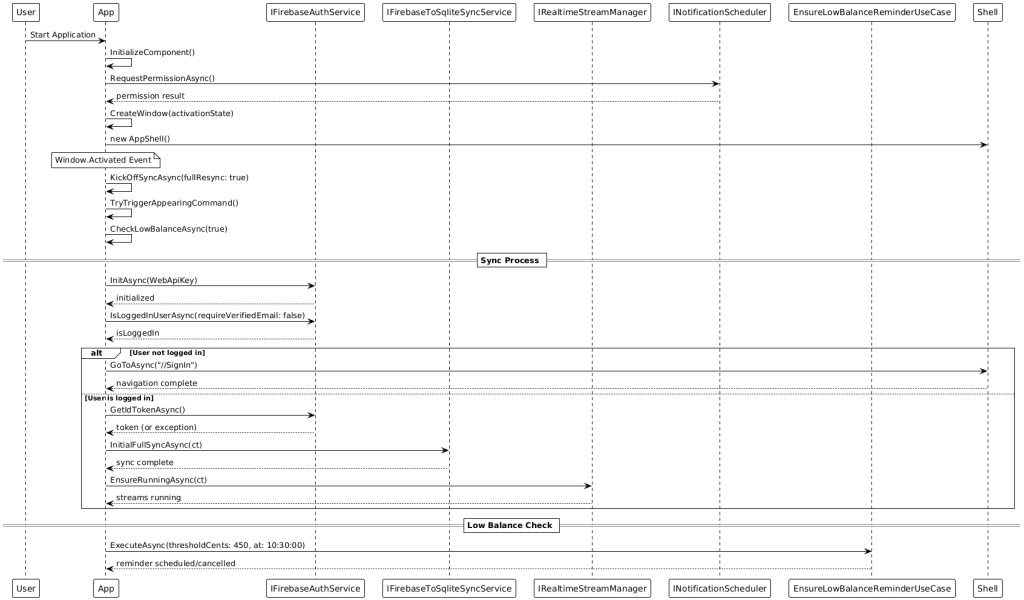
App Start Sequence Diagram
Menu Synchronisation
Data Synchronisation
Notification Handling
User Authentication
Notification Action Handling
AI Recommendation Service
AI Recommendations Offline
Recommendations Page Model
AI Response Mapping
User Profile Update
Complete Recommendation Flow
19. AI Web API on Spring Boot
Why a Spring Boot edge server for MAUI (instead of direct access to Gemini)
Summary: The Spring Boot edge server is the trust and control point. It protects secrets, enforces auth/quotas/policies, normalizes responses, provides fallback scoring, logging, and cost control—and satisfies privacy/compliance better than a direct App→LLM call.
Security & Secrets
• API‑key protection: No Gemini key in APK/IPA (easy to extract). The key remains server‑side.
• Auth enforcement: The server verifies Firebase ID tokens.
Resilience & UX
• Seamless fallback: On LLM timeout/error → local deterministic scoring (same API contract).
• Circuit breaker/retries/backoff: Solve network problems once centrally—instead of in all app variants.
Observability & Costs
• Central telemetry: Latencies, error rates, fallback ratio, prompt version—visible in the backend.
• Cost control: Caching/deduplication, limiting context, intelligent retries reduce API costs.
Platform independence (key point)
• One backend for all clients (MAUI iOS/Android/Windows). No duplicated integration/policy work per platform.
Why not MAUI → Gemini directly?
• Key‑leak risk in the app, hard to protect.
• No centralized and consistent prompt version.
• Less observability (debugging/tuning harder), no server‑side fallback.
Note: For purely iOS‑native scenarios, there are client‑side SDK options, but for a cross‑platform MAUI product app with offline‑first, notifications, sync, and clear operational requirements, the Spring Boot edge server is the more robust choice.
1) System / Component Overview
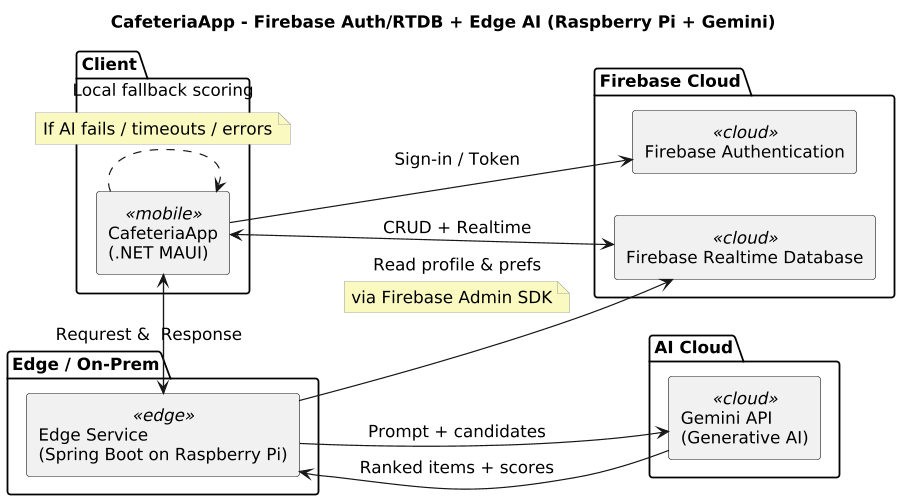
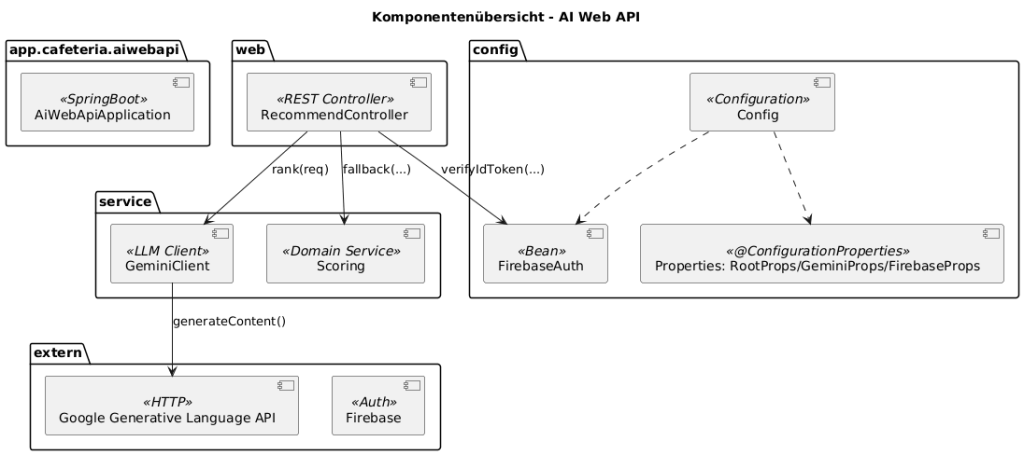
Main components
• RecommendController – endpoints, token validation, orchestration (LLM → fallback)
• GeminiClient – prompt construction, HTTP call to Google Generative Language API, parsing & sanitizing
• Scoring – deterministic recommendations (tokenization, weights, reasons)
2) Domain Model & Data Flows
Core objects
• RecommendRequest – contains PreferenceProfile, MenuDish[] OR MenuWeekly[], optional topN
• RecommendationResponse – contains List<RecommendationItem> incl. score and reasons
• MenuDish / MenuWeekly – menu data (day/week), names, descriptions, categories/tags
• PreferenceProfile – likes/dislikes (extensible)
Data flows
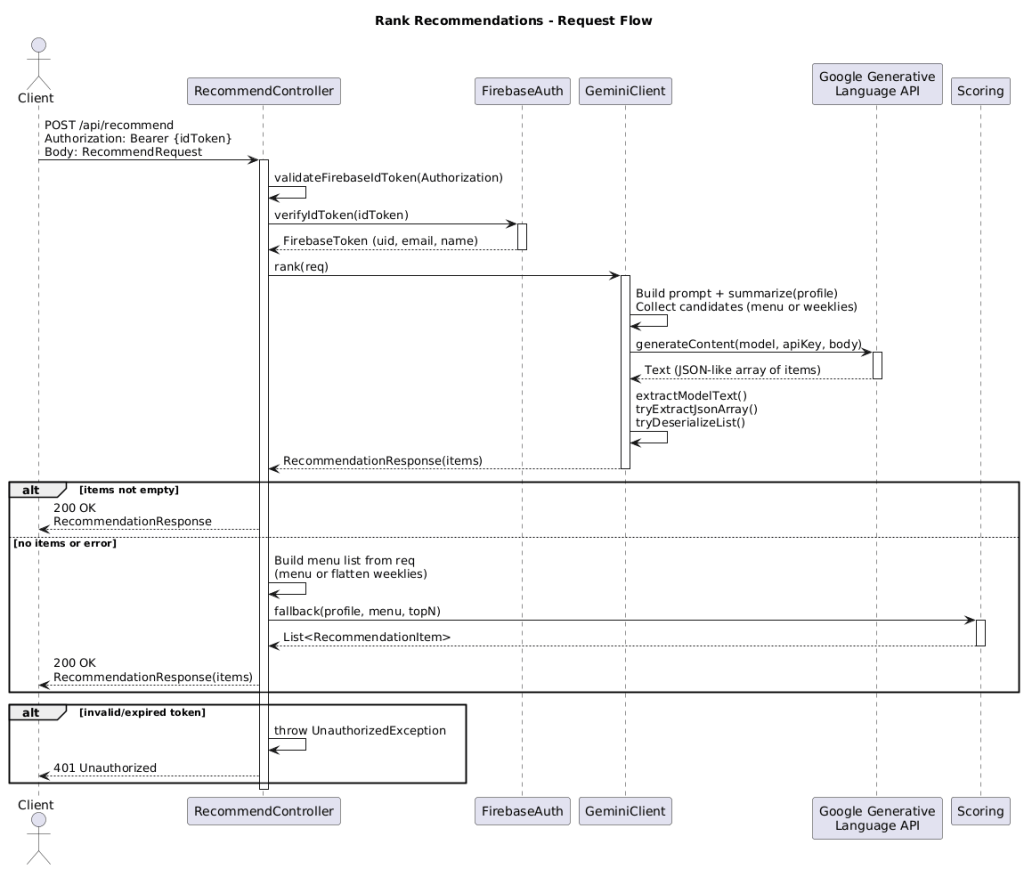
1. Client → Controller: Request with Authorization: Bearer <idToken> + payload
2. Controller → FirebaseAuth: Token verification → identity (uid, email, name)
3. Controller → GeminiClient: Ranking request
4. GeminiClient → Google API: Prompt → text response → JSON extraction
5. (Fallback) Controller → Scoring: deterministic list if LLM empty/failing
6. Controller → Client: RecommendationResponse
3) API Design
Endpoints
• GET /health → 200 OK with a short status message
• POST /api/recommend
– Header: Authorization: Bearer <idToken>
– Body (simplified schema):
{
„profile“: {„likes“: [], „dislikes“: []},
„menu“: [{„id“:“…“,“name“:“…“,“desc“:“…“,“cat“:“…“}],
„weeks“: [ /* optional weekly plans */ ],
„topN“: 5
}
– Response (sketched schema):
{
„items“: [
{„id“:“dish-1″, „name“:“…“, „score“:0.92, „reasons“:[„…“]}
]
}
Error codes
• 401 Unauthorized – invalid/missing token
• 400 Bad Request – invalid payload
• 5xx – internal/downstream errors (LLM)
4) Security Concept
User authentication (Firebase Auth)
User authentication is via Firebase Auth with email and password. Registration and sign‑in are straightforward, support password reset via email, and allow linking anonymous accounts to email accounts. Automatic token renewal provides seamless session management without repeated user intervention.
• AuthN: Verify Firebase ID token (verifyIdToken), check claims (aud, iss, exp)
• AuthZ: Lightweight—derive identity (uid/email), later roles/scopes are possible
• CORS: Whitelist via properties; allow only necessary methods/headers
• Secrets: gemini.apiKey, service‑account credentials via ENV/secret store (not in the repo)
5) LLM Integration & Prompting
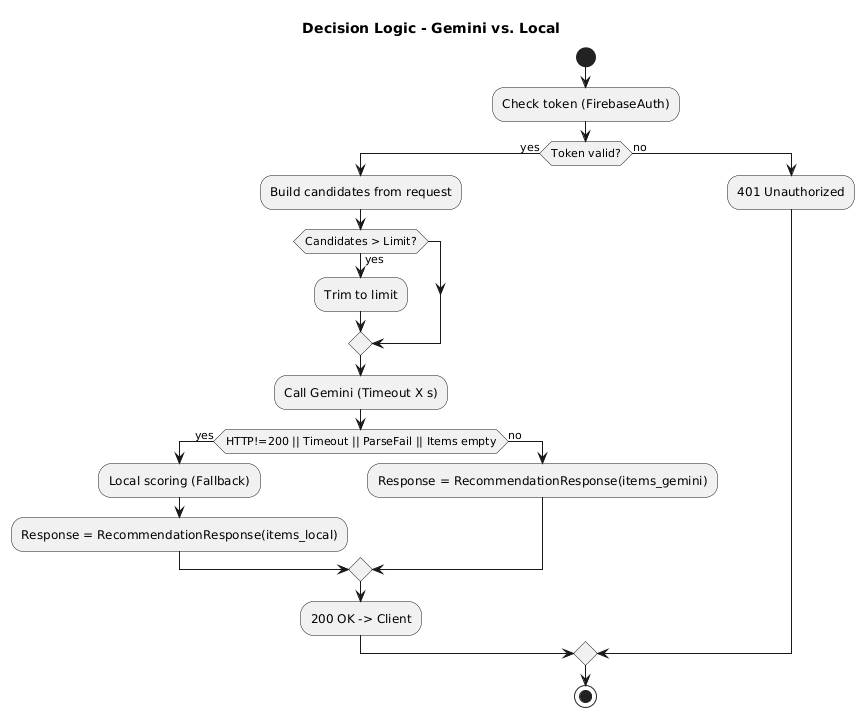
Execution & fallback strategy (Gemini vs. local scoring)
Primary path (Gemini):
• Input: RecommendRequest with profile, menu or menuWeeklies, optional lastRecommendItems
• Candidates prepared (menu/weeklies) and trimmed if necessary (max ~200)
• lastRecommendItems are provided (max ~50) so the model can use positive/negative signals
• Call GeminiClient → Generative Language API with timeout/token budget
• Parse model output robustly (JSON extraction + deserialization)
Fallback triggers (switch to local scoring):
• HTTP error/timeout/rate‑limit from the model
• Parse error or empty/unusable items
• Token budget/candidate limit exceeded (after trimming still failing → fallback)
• Feature flag / cost‑protection mode (“Local‑Only”)
Fallback behavior (local scoring):
• Scoring.fallback(profile, menu[, weeks], topN) computes the score deterministically:
score = CAT_W*sim_cat + NAME_W*sim_name + DESC_W*sim_desc − penalty(dislikes)
Decision flow
• Prompt building: Summarize menu/profile info (name/desc/cat) → concise, structured instruction with JSON output format
• Sanitizing: Remove markdown/prose, extract JSON array only
• Parsing strategy: (1) direct JSON parsing; (2) bracket extraction […] ; (3) heuristics (regex/mapper)
• Return model: list of RecommendationItem with (id/name/score/reasons)
• Cost/latency: model/temperature/maxTokens configurable in GeminiProps
• Fault tolerance: timeouts/retries with exponential backoff; on failure → fallback
6) Fallback Scoring (Algorithm & Formula)
Formula:
score = CAT_W * sim_cat + NAME_W * sim_name + DESC_W * sim_desc − penalty(dislikes)
Definitions
• CAT_W, NAME_W, DESC_W: weights for category, name, and description similarity (configurable, e.g., 0.5/0.3/0.2)
• sim_cat: similarity of category tokens between PreferenceProfile.categoryCounts and the dish’s categories (e.g., weighted Jaccard on normalized tokens)
• sim_name: similarity from name tokens (profile.nameCounts ↔ dish name)
• sim_desc: similarity from description tokens (profile.descriptionCounts ↔ dish description)
• penalty(dislikes): deduction when tokens from the dislike list occur (configurable strength per hit)
Normalization & tokenization
• Lowercasing, trimming, splitting by your SPLIT pattern
• Optional stop‑words; repeated occurrences increase relevance (counts)
• Normalize scores to [0..1] (e.g., via cosine/Jaccard, or min‑max)
Example (simplified)
• Weights: CAT_W=0.5, NAME_W=0.3, DESC_W=0.2
• sim_cat=0.8, sim_name=0.6, sim_desc=0.4
• penalty(dislikes)=0.2 (one dislike hit)
score = 0.5*0.8 + 0.3*0.6 + 0.2*0.4 − 0.2 = 0.46
Pseudocode (sketch)
tokens_name = tokens(dish.name)
tokens_desc = tokens(dish.description)
tokens_cat = tokens(dish.category)
sim_name = similarity(tokens_name, profile.nameCounts)
sim_desc = similarity(tokens_desc, profile.descriptionCounts)
sim_cat = similarity(tokens_cat, profile.categoryCounts)
pen = sum(dislike in (tokens_name ∪ tokens_desc ∪ tokens_cat)) * penaltyFactor
score = CAT_W*sim_cat + NAME_W*sim_name + DESC_W*sim_desc − pen
Edge cases
• Empty/missing description → sim_desc = 0 (weight buffers that)
• No categories → sim_cat = 0; fallback favors name/description
• Hard dislikes (e.g., allergens) ⇒ high penaltyFactor up to exclusion
Parameter hints (practice)
Weights: adjust CAT_W/NAME_W/DESC_W so their sum ≈ 1. Increase CAT_W if taxonomy labels are reliable; increase NAME_W/DESC_W if free text better reflects preferences.
Similarities: normalized to [0..1]. Common metrics: (weighted) Jaccard or cosine.
Penalty: simple model penalty = count * penaltyFactor (e.g., 0.2). Clamp final scores to [0,1].
 CodeCrafted